





01TATTOO SUPPLIERS
Precision stencil printing for the studio
Sleek and unobtrusive, this black unit sits neatly on a workstation or shelf, ready for the next session. Its compact form factor ensures it does not clutter the workspace while maintaining professional capability.
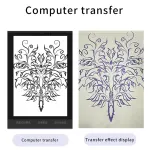
Designed for tattoo artists, it transfers patterns onto standard tattoo paper using thermal heat. It suits studios that require consistent, clear stencil reproduction from digital or printed designs.


02DESIGN
Compact ABS construction
The machine features a sturdy ABS body finished in solid black, measuring approximately 28 by 17 by 7.6 centimetres. This robust material choice supports daily use in a busy studio environment. The design prioritises stability during operation, ensuring the device remains steady while processing documents of varying thicknesses up to 0.15 millimetres.


04SPECS
Thermal precision details
Utilising CIS scanning and TPH recording, the device achieves horizontal resolution of 8 dots per millimetre. It handles fine line art and photographic elements effectively within its 210-millimetre effective width. Power consumption remains low at 5 watts in standby, drawing from AC 110V-240V sources with optional plugs for various regions.
05CARE
Operating conditions and care
The unit functions optimally between 5 and 35 degrees Celsius with relative humidity from 20 to 80 percent. An indicator light signals power status, while a separate error light alerts users to overheating issues. The packing carton measures 29 by 29 by 4.5 centimetres, weighing 0.61 kilograms, making storage and transport straightforward for mobile artists.


06AT A GLANCE
The key points
- ABS housing in matte black finish
- Handles A5 to A4 document sizes
- Mirror and Normal copy light modes
- Effective width approx 210mm
- TPH recording mode for stencils
Feature
- Mirror
- Shifts between tow kinds of light situation. Mirror Copy and Normal Copy. The default situation is Mirror Copy. When the mirror copy function starts, the mirror light works.
- Normal
- Shifts between tow kinds of light situation. When the normal copy function starts, the normal light works.
- Deepness 1
- To set the copied documents by Deepness 1. When the Deepness 1 works, the Deepness 2 goes off
- Deepness 2
- to set the copied documents by Deepness 2. When the Deepness 2 works, the Deepness 1 goes off.
- Copy
- To start the copy function.
- Stop
- To stop the copy function.
- Power
- The light indicates that the machine is prepared for working.
- Error
- The light is to show something wrong happened on the machine. When the TPH is Overheating, the light goes on
Specification
- Material
- ABS
- Scanning Mode
- CIS
- Scanning Resolution
- Horizontal: 8dot/mm, Vertical: 7.7line/mm
- Effective Scanning Width
- Approx. 210mm / 8.3inch
- Document Type
- Fine/Photo
- Document Size
- A5-A4
- Document Thickness
- Approx.0.06mm-0.15mm
- Recording Mode
- TPH
- Effective Printing Width
- Approx. 210mm / 8.3inch
- Power
- AC 110V-240V
- Power Consumption
- Standby 5W
- Frequency
- 50
- Working Temperature
- 5-35 degree celsius
- Relative Humidity
- 20%-80%
- Optional Plugs
- EU Plug, US Plug, AU Plug, UK Plug
- Color
- Black
- Size
- Approx. 28 * 17 * 7.6cm
- Item Type
- Transfer Machine
- Function
- Transfer Printing For Normal Tattoo Paper And Photo
How to use the tattoo transfer machine
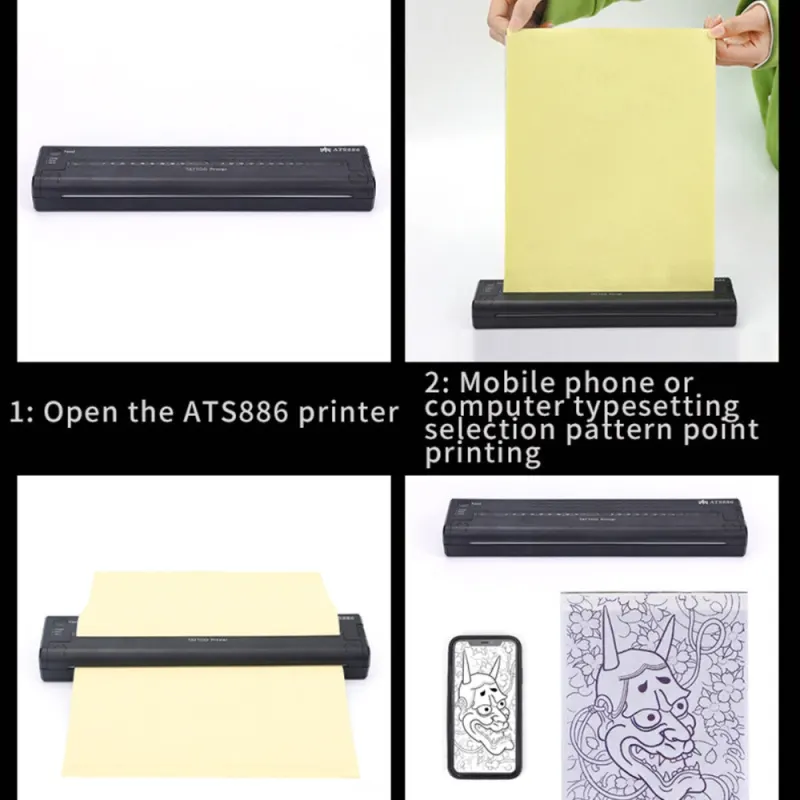
- Select your favorite pattern and type it on a blank paper.
- Turn the machine on.
- Open the transfer paper cover.
- Put the yellow side of the stencil sheets into the transfer paper input mouth.
- Put the printed pattern into the document feeder.
- Set up the copy mode
- Press the copy button.
- Note: If the warning signal sounds and ERROR light works, the machine will stop copying immediately
Operation panel introduction
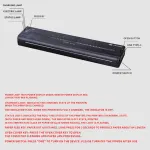
- Mirror
- The key shifts between two kinds of light situations. Mirror Copy and Normal Copy. The default situation is Mirror Copy. When the mirror copy function starts, the mirror light works.
- Error
- The light is to show something wrong that happened on the machine. When the TPH is Overheating, the light goes on.
- Normal
- The key shifts between two kinds of light situations. When the normal copy function starts, the normal light works.
- Deepness 1
- The key is to set the copied documents by Deepness 1. When the Deepness 1 works, the Deepness 2 goes off.
- Deepness 2
- The key is to set the copied documents by Deepness 2. When the Deepness 2 works, the Deepness 1 goes off.
Package Included
- 1xTransfer Machine
- 1xPower Adapter
- 1xUser Manual
- 100 PCS transfer paper (A box =100 PCS)
Attention
If the customer change their mind and want to cancel the order, please contact us within 2-3 hours after placing the order. Or, once the package is dispatched, we won’t be able to intercept packages in transit. Please understand.


Reviews
There are no reviews yet.