


01CLOCKS
Project the time onto your ceiling
The Wekker projection alarm clock transforms the dark expanse of a bedroom ceiling into a soft, legible display. It offers a gentle way to check the hour without the harsh glare of a traditional bedside lamp.
Designed for those who value a quiet start to the day, this device combines precise timekeeping with environmental awareness. It suits bedrooms and living spaces where ambient light is low and comfort is prioritised.


02PROJECTION
A wide angle for effortless reading
The unit projects the time across a 180-degree field, allowing the digits to appear clearly on walls or ceilings from a distance of 1.5 to 2.5 metres. This expansive reach ensures the information is visible from any position in the room, eliminating the need to lean forward or squint in the dim morning light.


04DISPLAY
Adjustable brightness for night comfort
Two brightness levels let you tailor the screen’s intensity to your surroundings. A dedicated night mode further dims the display during specified hours, preventing unnecessary light pollution while you sleep. You can define the exact start and end times for this dimming effect, aligning the clock’s behaviour with your personal circadian rhythm.
DETAILS
Temperature tracking and power resilience
The clock monitors ambient temperature every fifteen seconds, displaying it alongside the time and date in an alternating format. Units for both time and temperature are adjustable to preference. Powered via USB, the device includes a backup battery that maintains settings during outages, switching to power-saving mode to preserve data until mains power returns.
AT A GLANCE
The key points
- Projects time 1.5 to 2.5 metres away
- Three distinct alarm settings for weekdays
- Night mode dims screen at set times
- Records ambient temperature every 15 seconds
- USB powered with backup battery included
About this product
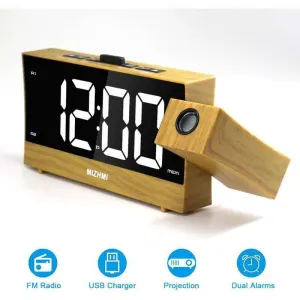
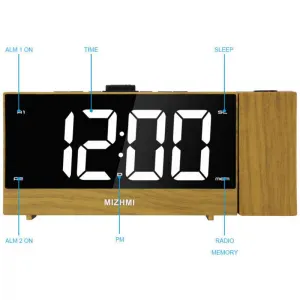
180° Projection: This projection clock has a 180° projection angle, and the optimal projection distance is 1.5 to 2.5 meters. The time can be projected onto the wall or ceiling, making it ideal for use in the bedroom or living room and easy to read. Snooze Function: The clock has three alarm settings so you can wake up at a set time: Monday to Friday, Saturday, or Sunday. When it’s time to get up, the alarm frequency gradually increases, allowing you to wake up more comfortably. If you feel drowsy when the alarm goes off, you can press the “IMG” button to activate the snooze mode and get an extra 1 to 60 minutes of sleep. Night Mode: This digital alarm clock has two brightness levels, allowing you to choose a comfortable brightness. You can also activate night mode, which dims the screen, and adjust the start and end times of night mode to suit your lifestyle. USB powered: This projection alarm clock is powered via a USB power cable. You will need to connect it to a power source. It also has a backup battery, which switches to power-saving mode and saves settings such as hourly alarms in the event of a power outage or temporary interruption. Humanized design: Anti-disturbance function at night. You can turn off the LED indicator when you sleep. The clock also has a temperature function that records the ambient temperature every 15 seconds. The temperature and time units can be adjusted to suit your preferences, and the time, date, and temperature can also be displayed alternately. Note: The projection clock’s screen is made of reflective material and has a protective film. Remove the protective film before use. Time and Date Settings: In normal clock mode, press the mode button to access the corresponding function mode in the following order: clock mode, date mode, temperature mode, night mode on/off. In the corresponding mode, press and hold the mode button for 2 seconds to access the setting mode. Use the UP/OFF button to increase or decrease each setting value, and hold the UP/OFF button to increase or decrease the setting value more quickly. Alarm Setting: In any mode, press the ALARM button to display the alarm mode. In alarm mode, press and hold the ALARM button to activate or deactivate the alarm. In any mode, press and hold the ALARM button for 2 seconds to access the setting mode, then press the UP/OFF button to increase or decrease each setting value. Hours → Minutes → Snooze Duration → Alarm Selection for Day of the Week 1-7/1-6/1-5 → Exit. The snooze time range is 1 to 60 minutes, with a default setting of 5 minutes. 12/24 Hour Time Switching: In time mode, press and hold the “MODE” button for 2 seconds to enter setting mode. The timer can be set to 12/24 hours. Snooze Mode: When the alarm sounds, press the “IMG/SNZ” button to stop the alarm and activate the snooze function. Press any other button to stop the alarm, or after 1 minute, press no button to stop the alarm. During snooze, press other buttons to deactivate the snooze function. Pressing the “IMG/SNZ” button does not affect the snooze function. Weekday Alarm: Press and hold the “ALARM” button to access the alarm settings. Press the “ALARM” button to change the alarm setting. When 1 to 7 appears, you can use the “UP/OFF” button to set the alarm for the day of the week.




Reviews
There are no reviews yet.